---
title: Girard (GSWH-2) E3 Troubleshoot
description: E3 GSWH-2 Error Code FIx
---
[Skip to content](https://support.austrv.com.au/girard/girard-gswh-2-e3-troubleshoot#main-content)
English
Show submenu for translations
Address
Open main navigation
Close main navigation
- English
Show submenu for translations
- Contact us
Contact us
How can we help you?
- There are no suggestions because the search field is empty.
1. [Girard Knowledge Base](https://support.austrv.com.au/girard?hsLang=en)
2. [Troubleshooting](https://support.austrv.com.au/girard/troubleshooting?hsLang=en)
# Girard (GSWH-2) E3 Troubleshoot
Firstly remove the cover to your white box (processor cover) located inside the unit. Check to make sure all your connections to your processor are clipped in correctly! If you notice any loose connections, rectify them and test the unit again. If this fails, please follow the instructions below.
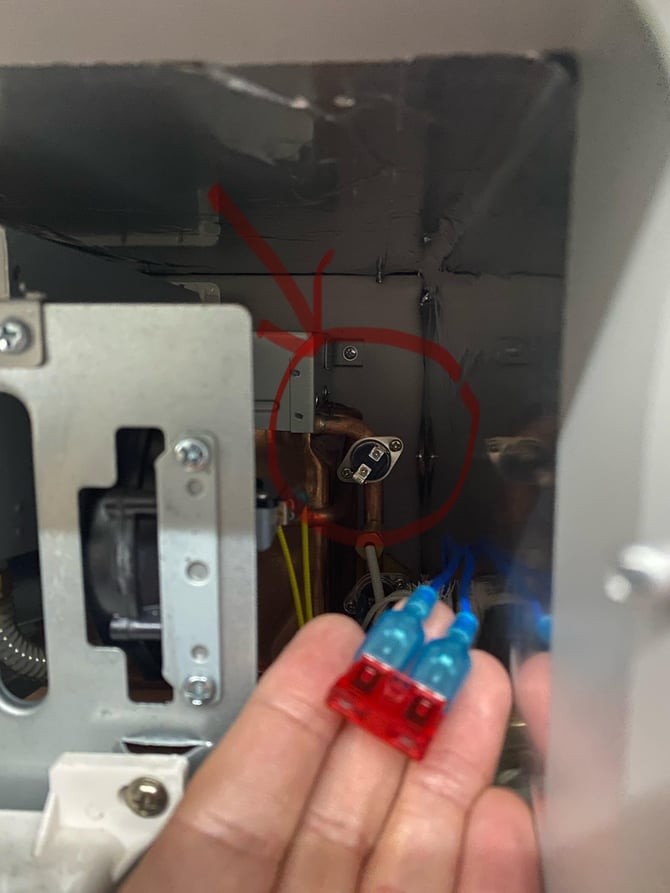
Switch off the unit (located inside the unit, left hand side). There are 2 wires from the top sensor / Ecosensor ( image 1) You can connect these wires to a standard fuse to bypass the sensor. You can unscrew this sensor if required for easier handling. Pull the blue sleeves back ( image 2) push the holding pin in on the crimp when removing each wire to avoid damaging the connections. Once plugged into the fuse, switch on the unit and retest.
- [Troubleshooting](https://support.austrv.com.au/girard/troubleshooting?hsLang=en)
# Address
[mailto:email@email.com](mailto:email@email.com)
Copyright © 2026, Address